venerdì 2 marzo 2012

60 Textured in modern websites for Inspiration

Using texture in web design trend is one of most common styles in modern web design, this style is become more popular every day, designers use different textures papers, woods, gadgets, to help you inspired we make this collection.

In this showcase you will find 65 fresh modern website designs using texture, we discovered to help you into your next design; we try to make our collection include many styles and unique ideas to make you stay up-to-date with trends and techniques.

All data provided by Wsvote our web design inspiration gallery.

I hope you will enjoy this article, and don’t forget to share it!
Using texture in web design

Edit Distance Java - Similar String

The edit distance of two strings commonly refers to the Levenshtein Distance of two strings- the amount of work it takes to transform one string to the other by either inserting, deleting, or changing one character at a time.

For example, changing sitting -> kitten takes 3
moves: sitting -> kitting, kitting -> kittin, and finally kittin -> kitten.

The algorithm to solve this in reasonable time takes dynamic programming, and has many applications such as word checking, and typing speed tests. Algorithm below:


public static int editDistance(String s, String t){
    int m=s.length();
    int n=t.length();
    int[][]d=new int[m+1][n+1];
    for(int i=0;i<=m;i++){
      d[i][0]=i;
    }
    for(int j=0;j<=n;j++){
      d[0][j]=j;
    }
    for(int j=1;j<=n;j++){
      for(int i=1;i<=m;i++){
        if(s.charAt(i-1)==t.charAt(j-1)){
          d[i][j]=d[i-1][j-1];
        }
        else{
          d[i][j]=min((d[i-1][j]+1),(d[i][j-1]+1),(d[i-1][j-1]+1));
        }
      }
    }
    return(d[m][n]);
  }
  public static int min(int a,int b,int c){
    return(Math.min(Math.min(a,b),c));
  }

It is important to note that there are only three possibilities one string can get to another: either deleting, inserting, or changing.

Thus, if we let L(i,j) indicate the cost it takes from changing i to j, if s and t are the original strings, the cost is:

Math.min(1+L(i-1,j-1),1+L(i,j-1),1+L(i-1,j)) unless the last characters of the strings are the same, then the minimum is L(i-1,j-1). This solves the problem, but note that it is very slow because of all the recursive calls, which repeat many similiar problems.

Thus, we use dynamic programming: Construct a matrix d[m][n] with sizes s.length() and t.length(). instead of recursive calls, we will use a matrix lookup which will store the smallest current cost to change a smaller i into j.

Thus, with he java algorithm code for edit distance above, the speed is O(mn) where m and n are the sizes of the strings.

martedì 21 febbraio 2012

www.arteverdehabitat.it a modern successful website: Designs gardens and parks in Padua

Arteverde www.arteverdehabitat.it is the last website that I posted. Arteverde designs and builds gardens and parks in Padua, Vicenza and throughout the Veneto. I built thiswebsite using prestashop.

Has been studied usability and strategies to increase the ranking. in a few days he wasvisited by thousands of visitors.


What do you think?


www.arteverdehabitat.it Progettazione giardini padova

giovedì 9 febbraio 2012

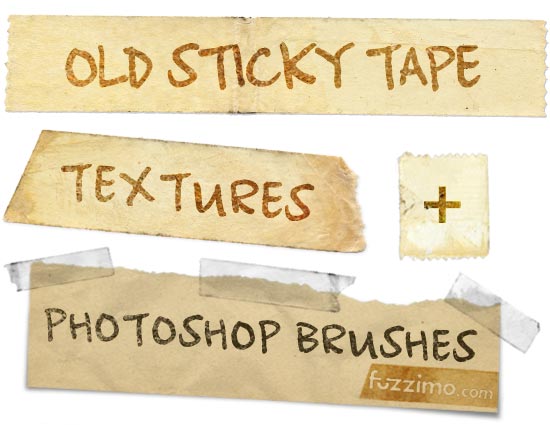
Free Old Sticky Tape Textures + PS Brushes


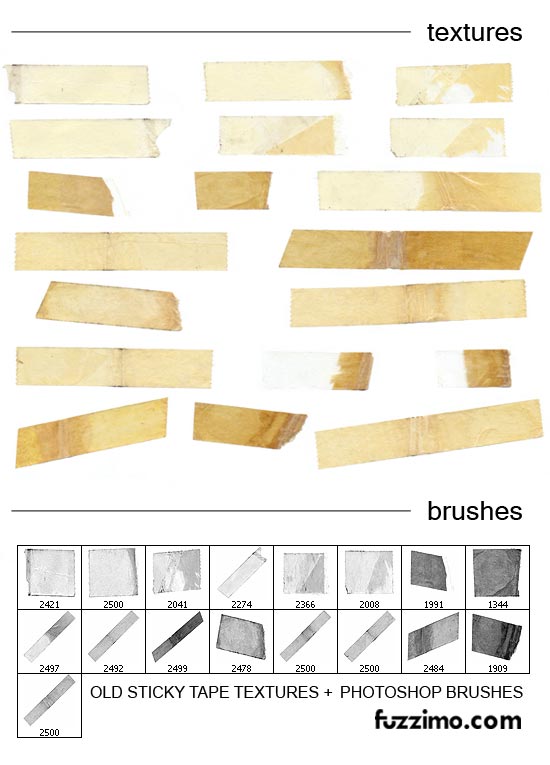
fzm-Old-Sticky-Tape-Textures-Photoshop-Brushes-01 Now here’s something very useful – high resolution sticky tape textures and Photoshop brushes. The images are scans of a few old clear tapes that I have peeled off some book jacket covers. Well, they’re not so clear anymore as time has turned them brown yellow, but now they make cool adhesive tape textures :). As mentioned before the images are hi-res – tape strip width is around 610px.
I have also put together 17 unique high resolution Photoshop brushes (around 2500px). I really like the way these brushes came out as you can quickly plaster a piece of scotch tape across a picture and get a realistic result. Here’s an image sample of how that looks:
fzm-Old-Sticky-Tape-Textures-Photoshop-Brushes-03 
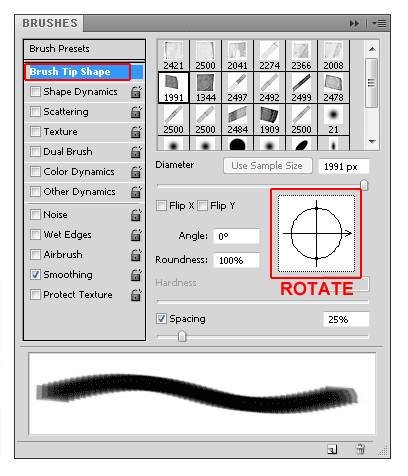
QUICK TIP: Just as with these sticky tape brushes, not all of them have the desired orientation by default. There are two ways of rotating them. The best method depends on the particular brush and how you intent to use it; in the image above I used each brush on a separate layer on top of the picture and rotated them individually with the Free Transform Tool. The other way to do it is to select your brush and then in the Brushes window (Window>Brushes or F5) select Brush Tip Shape and rotate the circle as shown in the image below.
fzm-Old-Sticky-Tape-Textures-Photoshop-Brushes-04 This second method would be very useful if you needed to use the same brush at a certain angle multiple times.
Check out the sticky tape textures and brushes screenshot below and the downloads are right after. Share the post or leave me a comment if you like them. Thanks!
fzm-Old-Sticky-Tape-Textures-Photoshop-Brushes-02 
0digg

BALLETTI & SHOW CHALLENGE IN VILLAGANZERLA, my new web site

This is my last web site http://www.ballettieshow.it

I build it for a ballet challenge: classic, modern dance, hip hop

What do you think about this site. I used prestashop framework


venerdì 7 ottobre 2011

Install GUI in Ubuntu Server

We have already discussed how to install ubuntu 9.04 LAMP server .If you are a new user and not familiar with command prompt you can install GUI for your ubuntu LAMP server using the 2 options


1) Install desktop Environment
2) Install Webmin

1) Install desktop Environment

First you nee to make sure you have enabled Universe and multiverse repositories in /etc/apt/sources.list file once you have enable you need to use the following command to install GUI
sudo apt-get update
sudo apt-get install ubuntu-desktop
The above command will install GNOME desktop
If you wan to install a graphical desktop manager without some of the desktop addons like Evolution and OpenOffice, but continue to use the server flavor kernel use the following command
sudo aptitude install --without-recommends ubuntu-desktop
If you want to install light weight desktop install xfce using the following command
sudo apt-get install xubuntu-desktop
If you want to install KDE desktop use the following command
sudo apt-get install kubuntu-desktop
2) Install Webmin in Ubuntu
Webmin is a web-based interface for system administration for Unix. Using any modern web browser, you can setup user accounts, Apache, DNS, file sharing and much more. Webmin removes the need to manually edit Unix configuration files like /etc/passwd, and lets you manage a system from the console or remotely.Currently There is no Webmin package in the Ubuntu repositories.This tutorial will explain how to Install Webmin in Ubuntu Jaunty
You can install webmin for your server web interface to configure apache2,mysql,FTp servers and many more.Now we will see how to install webmin in Ubuntu 9.04

Preparing your system
First you need to install the following packages
sudo aptitude install perl libnet-ssleay-perl openssl libauthen-pam-perl libpam-runtime libio-pty-perl libmd5-perl
Now download the latest webmin using the following command or from here
wget http://prdownloads.sourceforge.net/webadmin/webmin_1.470_all.deb
Now we have webmin_1.470_all.deb package install this package using the following command
sudo dpkg -i webmin_1.470_all.deb
This will complete the installation.

Using the Webmin APT repository
If you like to install and update Webmin via APT, edit the /etc/apt/sources.list file on your system
sudo vi /etc/apt/sources.list
add the line
deb http://download.webmin.com/download/repository sarge contrib
Save and exit the file
You should also fetch and install my GPG key with which the repository is signed, with the commands : cd /root
wget http://www.webmin.com/jcameron-key.asc
sudo apt-key add jcameron-key.asc
You will now be able to install with the commands
sudo apt-get update
sudo apt-get install webmin
All dependencies should be resolved automatically.
Ubuntu in particular don’t allow logins by the root user by default. However, the user created at system installation time can use sudo to switch to root. Webmin will allow any user who has this sudo capability to login with full root privileges.

Now you need to open your web browser and enter the following

https://your-server-ip:10000/

Now you should see similar to the following Screen


After login if you want to configure Apache,Mysql server you need to click on Servers on your lefthand side you should many servers are ready to configure
This is very Easy to configure most of the servers and Enjoy your new Ubuntu Jaunty LAMP Server.